REST API with Spring Boot
Basic
A way for software systems to communicate over the web using standard HTTP methods
- CRUD: Create, Read, Update, Delete - the basic database operations
HTTP Methods
| HTTP Method | Action | Description |
|---|---|---|
| POST | C: Create | Add a new resource |
| GET | R: Read | Fetch data (no changes) |
| PUT | U: Update | Replace an existing resource |
| PATCH | U: Update partially | Modify part of a resource |
| DELETE | D:Delete | Remove a resource |
REST endpoints example
| URL | Method | Meaning |
|---|---|---|
| /users | GET | Get all users |
| /users/5 | GET | Get user with ID 5 |
| /users | POST | Create a new user |
| /users/5 | PUT | Update user 5 completely |
| /users/5 | DELETE | Delete user 5 |
Spring Data Naming Conversion
IMPORTANT: Spring Data naming conversion for entity and field names
- Converting To SQL tables and columns: converted to snake_case
- Entity:
EmailAddress→email_address - Alter with
@Table(name = "email-address") - Field:
firstName→first_name - Alter with
@Column(name = "first-name") - Converting To JSON keys: converted to camelCase
- Entity:
EmailAddress→emailAddress - Field:
firstName→firstName - Alter with
@JsonProperty("first-name") - Converting To API endpoints: converted to pluralized camelCase
- Entity:
EmailAddress→emailAddresses - Alter with
@RepositoryRestResource(path = "emails")for JPA repository - Alter with
@RequestMapping("/emails")for controllers
- Entity/Tables are normally singular;
title | image - The user table is an exception and should be
usersbecause user is an sql keyword - Relation Tables are defined by their relation
- One-to-Many:
title_translation - Many-to-Many:
images_tags
Using Spring Data JPA & REST
Spring Data JPA removes boilerplate code for database operations by automatically making CRUD operations by mapping the entities to the SQL tables
Flow of operations: HTTP Request → Controller → Service → Repository → Database
- dependency: spring-boot starter-data-jpa
- Use for purely accessing databases, but does not automatically generate REST endpoints
Spring Data REST automatically exposes REST endpoints for entities managed by Spring Data JPA
- dependency: spring-boot starter-data-rest
- Automatically generates the following REST endpoints for entities managed by Spring Data JPA
GET /{entities}: returns all entries in the tableGET /{entities}/{id}: returns a specific entry by IDPOST /{entities}: creates a new entry in the tablePUT /{entities}/{id}: updates an existing entry in the table based on IDDELETE /{entities}/{id}: deletes an existing entry in the table
The software Postman can be used to testout API endpoints
Basic configuration for application.properties file:
# Handle connecting to MySQL database with the given username and password on localhost:3306/database_name
spring.datasource.driver-class-name=com.mysql.cj.jdbc.Driver
spring.datasource.url=jdbc:mysql://localhost:3306/full-stack-ecommerce?useSSL=false&useUnicode=yes&characterEncoding=UTF-8&allowPublicKeyRetrieval=true&serverTimezone=UTC
spring.datasource.username=username
spring.datasource.password=password

# Tells how Hibernate handles database schema generation. Options: none, validate, update, create, create-drop
spring.jpa.hibernate.ddl-auto=none

# Set the base path for the REST endpoints to /api; for example. localhost:8080/api/{entities}
spring.data.rest.base-path=/api

# allow jackson parser to process comments in payload
spring.jackson.parser.allow-comments=true
# application logging level
logging.level.org.springframework=INFO
Entities
Entities are the classes that represent the database tables with the following annotations
@Entity: marks the class as an entity- JPA, by default, maps the class name to the table name by converting CamelCase to snake_case:
UserAccount > user_account @Table: specifies the table name in the database@Id: marks the primary key field@GeneratedValue: specifies how the primary key is generated- GenerationType.IDENTITY: auto-incremented primary key
@Enumerated(EnumType.STRING): specifies that a field is an enum and will be sent as a string to SQL and in the JSON response@Column: specifies the column name in the database or else it maps to the field name- JPA maps the field name to the column name by converting CamelCase to snake_case:
firstName > first_name, but the JSON will use the field name as is - Every columns in a table must be mapped to a field either implicitly or explicitly using
nameoption
// Field in entity class
@Id
@Column(name = "customer_id")
private Long id;

// JSON representation
{
  "id": 1
}@ManyToOne: specifies a many-to-one relationship@OneToMany: specifies a one-to-many relationship@OneToOne: specifies a one-to-one relationship@JoinColumn: specifies the foreign key columnnameshould be the same as the foreign key column in current table that links to the parent entity- Given to the field in the child entity that references the parent entity
- Usually given to the "many" side in many-to-one or the child in one-to-one relationships
mappedBy:- Given to the field in the parent entity that represents the child entity
- The value is the name of the field in the child entity that references back to the parent entity
@ManyToMany: specifies a many-to-many relationship@JoinTable: in many-to-many relationships,@JoinTableis used on one side to specify the join table that owns the relation while the other side uses only@ManyToMany- IMPORTANT:annotation should be given to the entity side that gets updated/inserted
- For many-to-many relationships, cascade options:
- No cascade options if the relation is reference-lookup relation or shared entities
- Use
cascade = { CascadeType.PERSIST, CascadeType.MERGE }if dynamically creating relations - In both cases, JPA will automatically delete the entries in the row table if the row in the parent table is deleted
- Example: in images-tags join table, if an image is deleted, the associated rows in the join table are automatically deleted regardless of cascade setting
- However, when JPA tries to insert in one side and the other side is missing the entry, then JPA will not create a row in the join table
- Example: in images-tags join table, if a tag is missing when inserting an image, JPA will not create a row in the join table unless
CascadeType.PERSISTis true name: specifies the name of the join tablejoinColumns: specifies the columns in the join table that reference the parent entityinverseJoinColumns: specifies the columns in the join table that reference the child entity- Cascade: specifies what operations are cascaded from the parent entity to the child entities
- given to the parent side of the relationship
CascadeType.ALL: all operations are cascadedCascadeType.PERSIST: persist operation is cascadedCascadeType.MERGE: merge operation is cascadedCascadeType.REMOVE: remove operation is cascaded
@CreatedDate: marks a field to be automatically set to the current date when an entity is created@CreationTimestamp: marks a field to be automatically set to the current timestamp when an entity is created@UpdateTimestamp: marks a field to be automatically set to the current timestamp when an entity is updated@JsonProperty("customName"): add a custom field to be returned in the JSON response- Example:
@JsonProperty("country_id")
public Long getCountryId() {
    return country != null ? country.getId() : null;
}
Many-to-One Example:
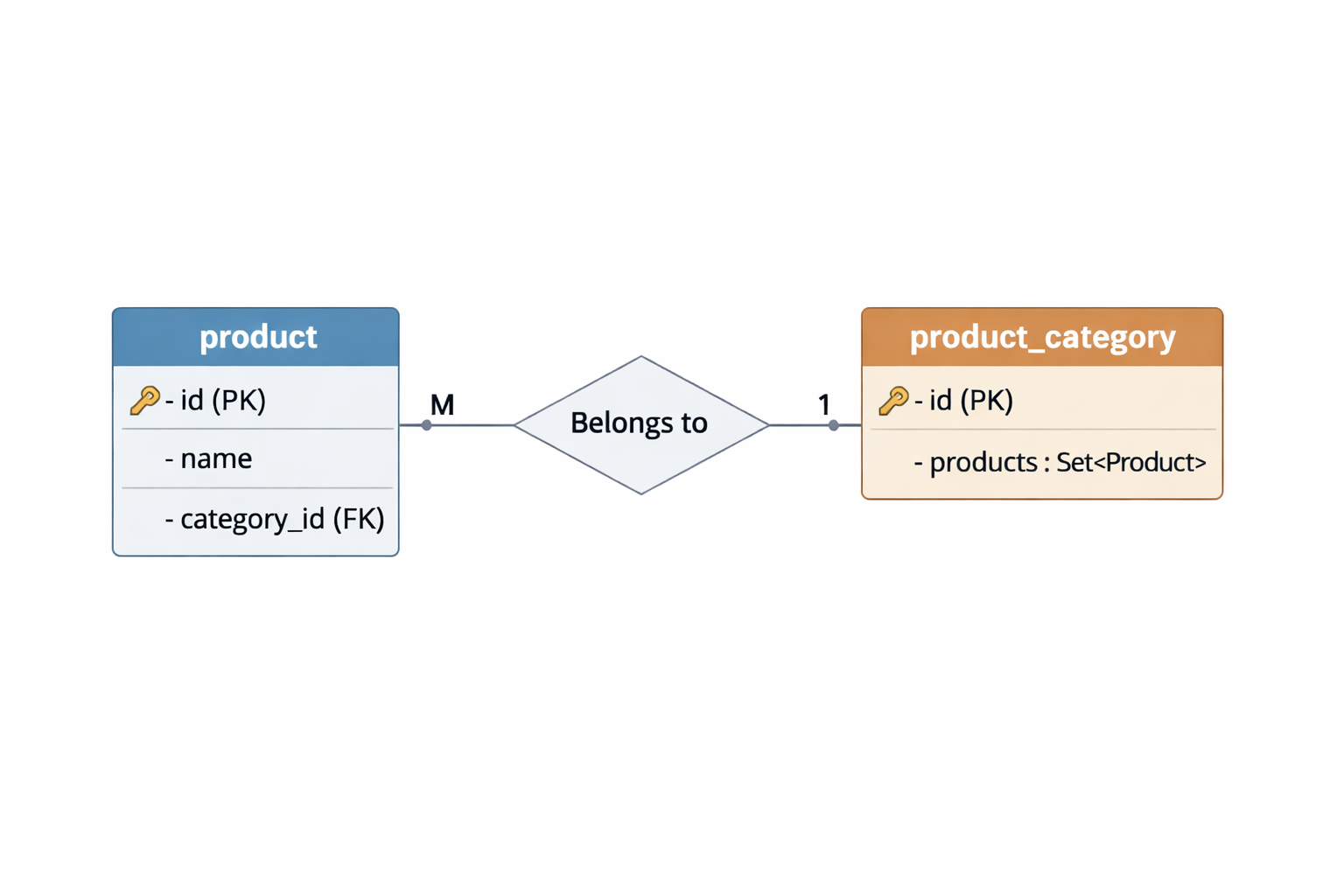
@Entity
@Table(name = "product")
@Data // lombok annotation for getters, setters, toString, equals, and hashCode
public class Product {
    @Id
    @GeneratedValue(strategy = GenerationType.IDENTITY)
    @Column(name = "id")
    private int id;

    private String name;

    // Many-to-one relationship: Product belongs to one ProductCategory
    @ManyToOne
    @JoinColumn(name = "category_id", nullable = false) // Foreign key column in the Product table
    private ProductCategory category;

    // Constructor
    public Product() {}

    public Product(String name, ProductCategory category) {
        this.name = name;
        this.category = category;
    }
}
--------------------------------------------------------
@Entity
@Table(name = "product_category")
@Data // lombok annotation for getters, setters, toString, equals, and hashCode
public class ProductCategory {
    @Id
    @GeneratedValue(strategy = GenerationType.IDENTITY)
    private int id;

    @OneToMany(mappedBy = "category", cascade = CascadeType.ALL, fetch = FetchType.LAZY)
    private Set<Product> products = new HashSet<>();

    // Constructor
    public ProductCategory() {}

    public ProductCategory(int id) {
        this.id = id;
    }
}
Many-to-Many Example:
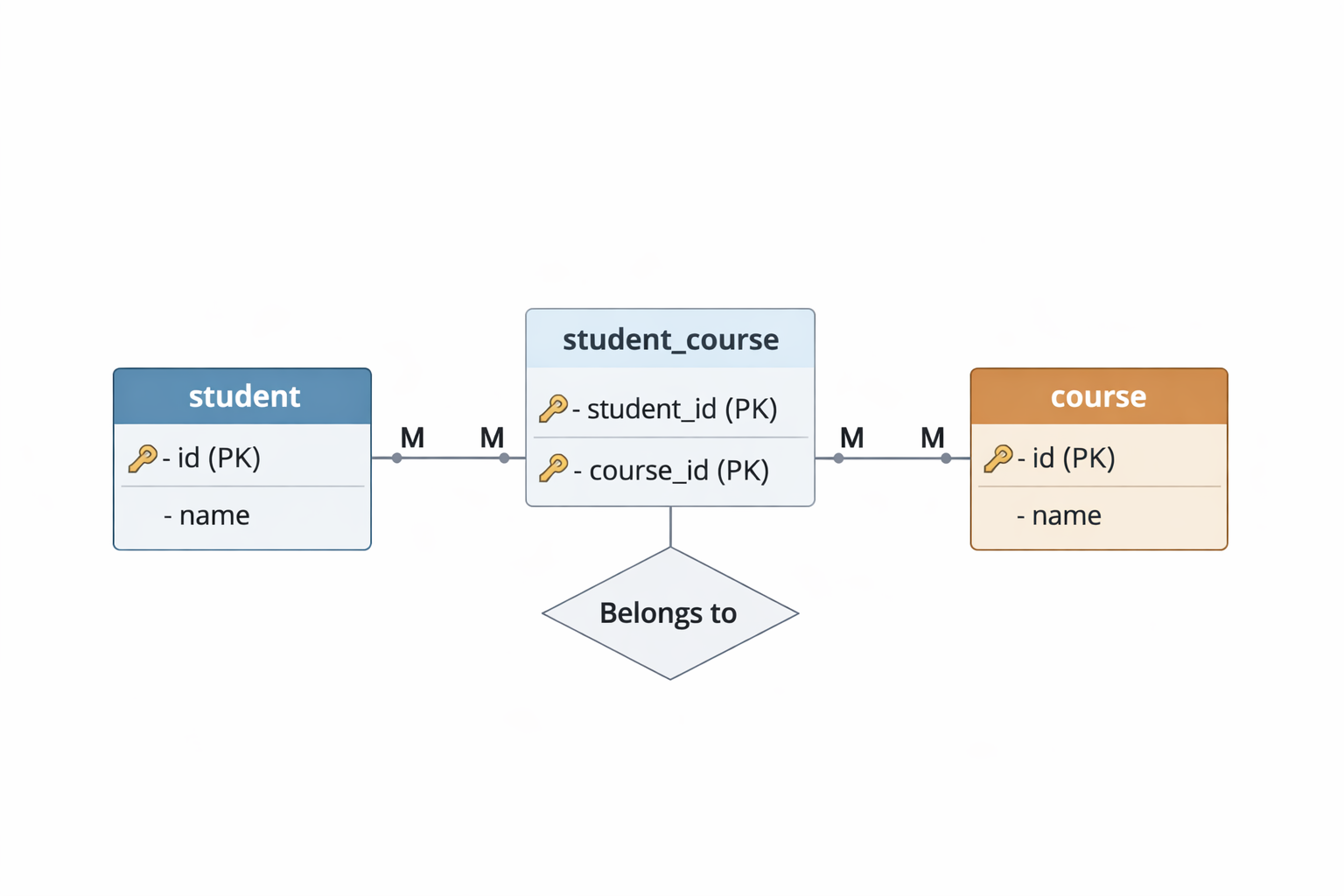
@Entity
@Table(name = "student")
public class Student {
    @Id
    @GeneratedValue(strategy = GenerationType.IDENTITY)
    private Long id;

    private String name;

    @ManyToMany
    @JoinTable(
        name = "student_course",
        joinColumns = @JoinColumn(name = "student_id"),
        inverseJoinColumns = @JoinColumn(name = "course_id")
    )
    private Set<Course> courseSet;
}
--------------------------------------------------------
@Entity
@Table(name = "course")
public class Course {
    @Id
    @GeneratedValue(strategy = GenerationType.IDENTITY)
    private Long id;

    private String name;

    @ManyToMany(mappedBy = "courseSet")
    private Set<Student> students;
}
JPA & REST Repository
When combined with spring-boot-data-rest, JPA repositories are automatically exposed as REST endpoints.
- To use the JPA repository, an interface must extends the
JpaRepository<{entity class},{primary key type}>while following the {entity}Repository naming convention @RepositoryRestResource: marks a JPA repository to be exposed as a REST endpoint by the spring-boot-data-rest; the following endpoints are exposed:- The endpoints will be the repository name, but lowercase and in plural form (Ex: CountryRepository > countries)
- Setting
@RepositoryRestResource(exported = false) prevent endpoints from being auto-generated so this repository can only be used to connect to the DB GET /{entities}: returns all entries in the tableGET /{entities}/{id}: returns a specific entry by IDPOST /{entities}: creates a new entry in the tablePUT /{entities}/{id}: updates an existing entry in the table based on IDDELETE /{entities}/{id}: deletes an existing entry in the table- Customizing the REST endpoints
@RepositoryRestResource(path = "custom-path"): changes the path of the REST endpoints to /custom-path@RepositoryRestResource(collectionResourceRel = "custom-json-name"): changes the default name of the collection in the JSON response@RepositoryRestResource(itemResourceRel = "custom-json-item-name"): changes the default name of the item resources in the JSON response@RepositoryRestResource(exported = false): disables the REST endpoints for the repository@CrossOrigin: allows cross-origin requests to the REST endpoints exposed by a JPA repository@CrossOrigin(origins = "http://localhost:3000:"): allows cross-origin requests from only localhost:3000@CrossOrigin("*"): allows cross-origin requests from any origin- JPA can automatically generate SQL based on the method name in the repository interface
- Example:
findById(value)generates SQL to find entities by a specific id value
@RepositoryRestResource
@CrossOrigin("*")
public interface OrderRepository extends JpaRepository<Order, Long> { }

// The above repository will expose the following REST endpoints:
// GET /orders
// GET /orders/{id}
// POST /orders
// PUT /orders/{id}
// DELETE /orders/{id}
Custom Query Methods
JPA repositories support custom query methods for your services or custom endpoints by automatically generating SQL based on method names or using the @Query annotation with a custom SQL query
- Method Name Queries:
- JPA uses a base name + the entity's field name and certain keywords to generate SQL queries
- The default endpoints created are base +
/plural-repository-name/search/{method-name} - Example endpoints of a
UserRepository: - Method:
findByEmailAddressContaining(String emailAddress) - URL:
/users/search/findByEmailAddressContaining?emailAddress=example@example.com - Method:
countByIsActiveFalse(): - URL:
/users/search/countByIsActiveFalse - Base:
findBy | readBy | getBy | queryBy | countBy | existsBy | deleteBy - Keywords:
And | Or | Not | IsNull | IsNotNull | Between | LessThan | GreaterThan | Like | True | False - For nested fields, JPA can also figure out based on the method name
@Entity
public class Order {
    @ManyToOne
    private User user;
}
---------------------------------------------------------
@Entity
public class User {
    @Column(name = "email_address")
    private String emailAddress;   // ✅ Java field uses camelCase

    @Column(name = "active")
    private boolean isActive;
}
---------------------------------------------------------
// Simple fields example for User entity

@RepositoryRestResource
public interface UserRepository extends JpaRepository<User, Long> {

  List<User> findByEmailAddressContaining(String emailAddress); // WHERE email_address LIKE '%emailAddress%'

  List<User> findByIsActiveTrue();    // WHERE active = true

  long countByIsActiveFalse();        // COUNT WHERE active = false; return the number of rows in DB with isActive = false

  boolean existsByIsActiveTrue();     // EXISTS WHERE isActive = true; if any row in DB exists with isActive = true, return true, else false
}
---------------------------------------------------------
// Nested fields example for Order.user entity

@RepositoryRestResource
public interface OrderRepository extends JpaRepository<Order, Long> {

  List<Order> findByUserEmailAddress(String emailAddress); // WHERE user.email_address = ?
}@Query with JPQL queries:- Allows you to write custom JPQL queries for repository methods
- JPQL queries the Java entities and fields, not the SQL table and column names
@Query("SELECT u FROM User u WHERE u.age > :age") // SELECT User entity WHERE User.age is greater than the given age parameter(:age)
List<User> findUsersOlderThan(@Param("age") int age);@Query with raw SQL queries:- Raw SQL queries can be used by adding the argument
nativeQuery = true - JPA will query the table and column as defined in the raw query
@Query(value = "SELECT * FROM users u WHERE u.user_age > :age", nativeQuery = true) // JPA will query the "users" table and "user_age" column as defined in the raw SQL query
List<User> findUsersOlderThanNative(@Param("age") int age);
Services and Controller
When using JPA repositories with spring-boot-data-rest, the services and controllers are automatically generated for the basic CRUD endpoints
However, to handle custom logic, @Service and @RestController classes are needed
@Service: marks a class as a service and Spring bean that contains business logic- Holds, business rules and validations logic
@Transactional: marks a method, ensuring that all database operations within the method are part of a single transaction. Once marked, Spring make sure the all operations in the method succeeds or fails together and roll back the DBrepository.save(entity)orrepository.saveAll(entities): methods to save entities to the database
@Service
public class OrderService {
    private final OrderRepository orderRepository;

    @Autowired
    public OrderService(OrderRepository orderRepository) {
        this.orderRepository = orderRepository;
    }

    @Transactional
    public void placeOrder(Purchase purchase) {
        purchase.getItems();
        ... // other business logic and validations
        orderRepository.save(purchase.getOrder());    // save order to the database
        orderRepository.saveAll(purchase.getOrders()); // save all orders in the purchase to the database in batch
    }

    @Transactional(readOnly = true)
    public Purchase getOrder(Long id) {
        // query for order by ID
        return orderRepository.findById(id).orElse(null);
    }
}@RestController: marks a class as a REST controller that handles HTTP requests and returns JSON/XML responses- Every method returns JSON/XML responses and can be associated with custom endpoints for the REST API
- Maps HTTP methods and routes
- Handles request and response processing for the associated entity/table
@RequestMapping: define the base path for all endpoints in the controller/class@GetMapping: maps a method to a GET endpoint@PostMapping: maps a method to a POST endpoint@PutMapping: maps a method to a PUT endpoint@DeleteMapping: maps a method to a DELETE endpoint@PathVariable: maps a method parameter to a path variable in the URL@RequestParam: maps a method parameter to a query parameter in the URL@RequestBody: maps a method parameter to the request body
@RestController
@RequestMapping("/api/order")
@Cross-Origin("*")
public class OrderController {
    private final OrderService orderService;

    @Autowired
    public OrderController(OrderService orderService) {
        this.orderService = orderService;
    }

    // Map a POST request to /api/order/purchase to the placeOrder method
    @PostMapping("/purchase")
    public PurchaseResponse placeOrder(@RequestBody Purchase purchase) {
        return orderService.placeOrder(purchase);
    }

    // Map a GET request to /api/order/{id} to the getOrder method
    @GetMapping("/{id}")
    public Purchase getOrder(@PathVariable Long id) {
        return orderService.getOrder(id);
    }
}
Pagination and Sorting
JPA can paginate the result so not all rows are loaded at once and sort the result as well
- Hard Limit on Page Size:
- By default, Spring Boot sets a hard limit of 1000 rows per page, but can be set with the following lines in
application.properties: spring.data.web.pageable.max-page-size=100spring.data.web.pageable.default-page-size=20- Sorting:
- Use the
sortquery parameter in the HTTP request to sort the results - Example:
?sort=emailAddress,asc - Pagination of HTTP requests:
- Make the JPA repository methods return a
Page<{entity}>and add aPageableparameter to the method - Add
Pageableparameter to the controller that handle HTTP request while including the default size and page number - Some example API endpoints with pagination
GET /api/users?page=0&size=10GET /api/users?page=1&size=5&sort=age,desc
@Entity
public class User {
    @Column(name = "email_address")
    private String emailAddress;   // ✅ Java field uses camelCase

    @Column(name = "active")
    private boolean isActive;
}
---------------------------------------------------------
// Add pagination to the JPA repository methods

@RepositoryRestResource
public interface UserRepository extends JpaRepository<User, Long> {

  Page<User> findByEmailAddressContaining(String emailAddress, Pageable pageable); // WHERE email_address LIKE '%emailAddress%'

  Page<User> findByIsActiveTrue(Pageable pageable);    // WHERE active = true
}
---------------------------------------------------------
// Add pagination to the controller that handles the HTTP request

@RestController
@RequestMapping("/api/users")
@Cross-Origin("*")
public class UserController {

    private final UserRepository userRepository;

    @Autowired
    public UserController(UserRepository userRepository) {
        this.userRepository = userRepository;
    }

    // Map a GET request to /api/users?email=random@gmail.com
    @GetMapping
    public Page<User> findUsersByEmail(
      @RequestParam String email,
      @PageableDefault(size = 20, sort = "emailAddress") Pageable pageable) { // Spring autowires the Pageable parameter from the query params in the HTTP request

        return userRepository.findByEmailAddressContaining(email, pageable);
    }
}- Normally used in a service class and not the controller
- Create a
PageRequestand pass that as the pageable
@Service
public class OrderService {
    private final OrderRepository orderRepository;

    @Autowired
    public OrderService(OrderRepository orderRepository) {
        this.orderRepository = orderRepository;
    }

    public Page<Order> checkOrdersStatuses(int pageNumber, int pageSize) {
        Pageable pageable = PageRequest.of(pageNumber, pageSize, Sort.by("createdAt").descending());
        return orderRepository.findByStatus("PENDING", pageable);
    }
}
CommandLineRunner
CommandLineRunner is a Spring interface that allows you to run code when the application starts up, after Spring finishes initializing. It behaves similarly to Runnable.
- To make use of it, have a
ComponentimplementsCommandLineRunnerand override therunmethod. - Prep/admin tasks can be done in
run()method
@Component
public class DataInitializer implements CommandLineRunner {

    private final UserRepository userRepository;

    public DataInitializer(UserRepository userRepository) {
        this.userRepository = userRepository;
    }

    @Override
    @Transactional
    public void run(String... args) {
        if (userRepository.count() == 0) {
           User admin = new User("admin");
           User user = new User("user");

           List<User> users = List.of(admin, user);
           userRepository.saveAll(users);
        }
    }
}
Enable HTTPS
Securing Front-End and Spring Boot server communication:
- Get the cert and key:
yourdomain.crt/fullchain.pem,yourdomain.key, and possiblyintermediate.pem - Create a PKCS12 keystore that contains the cert and key for Spring Boot
- The keystore can be replaced if using self-signed
- Configure Spring Boot to use the keystore in
application.propertiesorapplication.yml: - Change the front-end urls to HTTPS
openssl pkcs12 -export
  -in yourdomain.crt
  -inkey yourdomain.key
  -certfile intermediate.pem
  -name springboot
-out keystore.p12server.port=8443
server.ssl.enabled=true
server.ssl.key-store=classpath:keystore.p12
server.ssl.key-store-password=yourpassword
server.ssl.key-store-type=PKCS12
server.ssl.key-alias=springbootSecuring Spring Boot and MySQL server communication:
- Enable SSL in Spring Boot
application.propertiesorapplication.yml: - Keypoints:
useSSL=true: enables SSL for the connectionrequireSSL=true: requires SSL for the connectionverifyServerCertificate=true: enables server certificate verification- Obtain cert and keys for MySQL server:
ca.pem,server-cert.pem, andserver-key.pem - Edit
my.cnformy.iniand add under[mysqld]to enable SSL and restart server:
spring.datasource.url=jdbc:mysql://localhost:3306/mydb?useSSL=true&requireSSL=true&verifyServerCertificate=true

spring.datasource.username=user
spring.datasource.password=pass[mysqld]
ssl-ca=/path/to/ca.pem
ssl-cert=/path/to/server-cert.pem
ssl-key=/path/to/server-key.pem
require_secure_transport=ON # forces TLS connectionsGenerating self-signed certificates for development:
Instruction to generate self-signed cert for keystores: Keystore Steps
Configuration
The RepositoryRestConfigurer interface allows you to customize the spring-data.
Basic Setup:
@Configuration
public class RestDataConfig implements RepositoryRestConfigurer {

    @Override
    public void configureRepositoryRestConfiguration(
      RepositoryRestConfiguration config, CorsRegistry cors) {
        config.exposeIdsFor(Product.class);
        config.setDefaultPageSize(Integer.MAX_VALUE);
        config.setMaxPageSize(Integer.MAX_VALUE);
        ... // other configurations
    }
}
Options:
.exposeIdsFor(...): exposes the IDs of the given entity classes in the REST endpoints.setDefaultPageSize(...): sets the default page size for all REST endpoints.setMaxPageSize(...): sets the maximum page size for all REST endpoints.getExposureConfiguration(): returns the exposure configuration for the REST endpoints to be able to disable specific HTTP methods
//Example: Disabling specific HTTP methods for an entity

HttpMethod[] theUnsupportedActions = {HttpMethod.PUT, HttpMethod.POST, HttpMethod.DELETE, HttpMethod.PATCH};

// disable HTTP methods for Product: PUT, POST, DELETE and PATCH
config.getExposureConfiguration()
    .forDomainType(Product.class)
    .withItemExposure((metdata, httpMethods) -> httpMethods.disable(theUnsupportedActions))
    .withCollectionExposure((metdata, httpMethods) -> httpMethods.disable(theUnsupportedActions));
Common Errors
@Dataannotation of Lombok can generate error when placed on Entity classes so it should be replaced with@Getterand@Setterannotations individually.
Production
Steps to bring Spring Boot to deployment in server:
- Compile/Build the Spring Boot project into a JAR file
- Using Maven:
mvn clean package - the
.jarfile is generated in thetargetdirectory likespringboot-0.0.1-SNAPSHOT.jar - Using Gradle:
./gradlew build - the
.jarfile is generated in thebuild/libsdirectory likespringboot-0.0.1-SNAPSHOT.jar - Setup the server and copy JAR file over:
- Install Java 17 on the server:
sudo apt install openjdk-17-jdk -y - Copy the JAR file to a non-root directory on the server:
scp target/springboot-0.0.1-SNAPSHOT.jar user@server-ip:/home/user/ - Setup a service to run the JAR file:
- Create a service file:
sudo nano /etc/systemd/system/springboot.servicewith the following content - Reload the config file:
sudo systemctl daemon-reload - Start the service:
sudo systemctl start springboot.service - Enable the service to start on boot:
sudo systemctl enable springboot.service - Check the status of the service:
sudo systemctl status springboot.service - Check the logs of the service:
sudo journalctl -u springboot.service - By default, the spring boot app runs on port 8080
- Optional: set up reverse proxy with Nginx or Apache to access app on a different port or domain
- Install Nginx:
sudo apt install nginx -y - Create the config file:
sudo nano /etc/nginx/sites-available/springboot.conf - Test the Nginx configuration for errors:
sudo nginx -t - Enable the Nginx site:
sudo ln -s /etc/nginx/sites-available/springboot.conf /etc/nginx/sites-enabled/ - Reload Nginx:
sudo systemctl reload nginx
[Unit]
Description=My Spring Boot Application
After=network.target

[Service]
User=youruser
ExecStart=/usr/bin/java -jar /home/youruser/springboot-0.0.1-SNAPSHOT.jar
Restart=always

[Install]
WantedBy=multi-user.target# Nginx sample configuration
server {
listen 80;
server_name mydomain.com;
# define the API endpoints that this block handles
location / {
# apply rate limit only if $limit_bypass is 1
limit_req zone=api_limit burst=10 nodelay if=$limit_bypass;
# Forward requests to port 8080
proxy_pass http://127.0.0.1:8080;
proxy_set_header Host $host;
proxy_set_header X-Real-IP $remote_addr;
proxy_set_header X-Forwarded-For $proxy_add_x_forwarded_for;
proxy_set_header X-Forwarded-Proto $scheme;
}
}